Windows Admin Center VM
Migration Steps
Intro
I Use windows admin center - it is a sever 2019 no gui install. I am uising these generic instructions to import so won't document in detail.
Learning from the disaster moving my DCs where i went the hardway (backup and restore - which did work) this time i will use the right versions of the disk import command qm disk import [...]
Driver install
I had real issues with driver install - while i ran the installer and everything seemed to install it didn't I think this is because this was server core 2019 with no gui as such i had to install each driver i wanted like this:
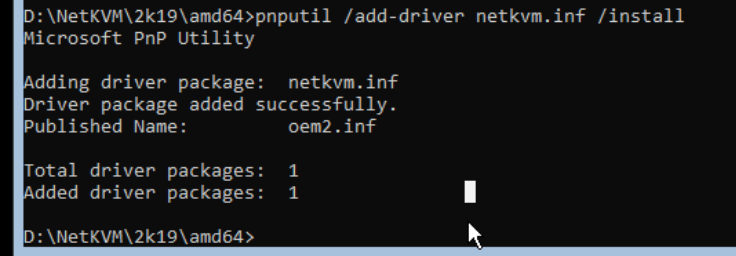
I did this for all the following drivers:
- NetKVM for virtio networking
- viostor for virtio block device etc)
- Balloon for memory
- ran the guest tools msi (the one in the subdir of the dvd) with msiexec -i
I never got all installed
Enable IPv6 on all adapters
this machine isn't a server so i am fine having it get its ip with dhcp and register with DNS
since i built it i have got an IPv6 network
this is how to enable it on all adapters
Enable-NetAdapterBinding -Name "*" -ComponentID ms_tcpip6
Installing features on demand (learn from me, make this the first step before you export the VHD...)
om my 2022 server core i think i could install all the virtio drivers because the app compat FOD was installed i tried installing it onserver 2019 core but this dind't install correctly. After i had done all the above i figured out this command and installed the packk and rebooted.
Add-WindowsCapability -Online -Name ServerCore.AppCompatibility~~~~0.0.1.0
Then i reinstalled the virtio toosl by doing a repair.
Unclear this made a difference, however the machine is running and thus:
- "We have normality. I repeat, we have normality. Anything you still can't cope with is therefore your own problem."
This page started as a gist: the original, with its comments