adguard two node setup with adguard sync
Description
- UPDATED 9/2/2025 - here we are a few years later, adguuard has been stable as heck
- now i wanted to add IPv6 to this mix
these were the steps
- stop the stack
- delete the 6 adguard config networks and the two deployed macvlans from within portainer
-
recreate using the instructions below adding the following for IPv6 (note the Ipv6 are the documented subnet examples - don't use them, use ones right for your network)
-
assign the actual MVL networks (i actually renamed mine so the 6 config networks are called adguard1/2-config and the two macvlan networks are called adguard1/2-mvl - much easier, i had them the wrong way round when i wrote the original article)
- restart the stack (it really was this easy)
- learning: also the randomness i talk about below when selecting the networks in the UI can be avoided if all your machines are hosts!
- don't forget to add the IPv6 upstream resolvers in adguard
I wanted redundant adguard - there are two ways to do this:
- run single swarm instance and assume swarm will keep the service running (i ahve a template for this at the bottom of this gist)
- run two instances so you can specify two DNS servers on client - this is much harder and requires adguard sync too - this is what we are covering in this gist.
- I also wanted adguard to accurately record the client host names accessing adgaurd - this meant i needed to use macvlan networking.
- I also wanted to use native ports like 443 but have other services that need to use that too so rather than use host networking i used macvlan/ This is not rquired but i wanted to make this one
interesing:-)
Update as of 2026.09.24: this is how i first set it up. what i run now is at the end.
State Considerations for SWARM
Each of the two nodes needs to have their own confgi and worker mounts. I chose to use the glusterfs volume driver to make these so they are available on any node.
Network Considerations
Wow, this is the most complex network setup because i need each adguard instance to be able to have its own MAC and IP address and i needed the adguard sync container to be able to sync between the two nodes. Also macvlan in swarm is a quite complex and a little werid. We have the following networks in this config:
-
adguard1-mvl-config
- public macvlan config for adguard1 and is dsitributed to all 3 docker nodes
-
adguard1
- public macvlan network used in the adgaurd1 container
-
adguard2-mvl-config
- public macvlan config for adguard2 and is dsitributed to all 3 docker nodes
-
adguard2
- public macvlan network used in the adgaurd2 container
-
adguard_sync
- private overlay network to allow all 3 nodes to talk to each other for purpose of sync
Placement Considerations
- It is not possible to have a single host adapter (i.e eth0) have two macvlans running at the same time.
- It is not possible to have a sigle host support two default gateways.
- You may see placement rejection of the second service if it initially tries to place it on the same node as the other adguard instance. Once rejected docker will try the service on another node and it will wok. The rejection errors can be ignored. This works as an implicit placement constraint. If someone knows how to specifiy that two services in the same stack run on different swarm nodes (lables won't cut it in this 3 node scenario) let me know in the comments!
Reaching AdGuard from the node it runs on
A macvlan child cannot talk to its parent. The node running an AdGuard cannot reach it, and nor can any container on that node. Other nodes on the LAN can. Anything on that node that needs DNS or the AdGuard API times out.
Each docker host carries a macvlan shim to fix it. mac0 is a second macvlan
child of eth0, and child-to-child traffic is allowed, so routing the two
resolver addresses out of it works. eth0's own stanza in
/etc/network/interfaces builds it:
allow-hotplug eth0
iface eth0 inet static
  address 192.168.1.41
  netmask 255.255.255.0
  gateway 192.168.1.1
  post-up ip link add mac0 link eth0 type macvlan mode bridge 2>/dev/null || true
  post-up ip link set dev mac0 up
  post-up ip addr add 192.168.1.41/32 dev mac0 2>/dev/null || true
  post-up ip route replace 192.168.1.5/32 dev mac0 src 192.168.1.41
  post-up ip route replace 192.168.1.6/32 dev mac0 src 192.168.1.41
  post-up iptables -N DOCKER-USER 2>/dev/null || true
  post-up iptables -C DOCKER-USER -o mac0 -j ACCEPT 2>/dev/null || iptables -I DOCKER-USER -o mac0 -j ACCEPT
  post-up iptables -C DOCKER-USER -i mac0 -j ACCEPT 2>/dev/null || iptables -I DOCKER-USER -i mac0 -j ACCEPT
  pre-down ip link del mac0 2>/dev/null || true
- only the host's own address changes per host, in the
ip addrline and bothsrc - it is in
eth0's stanza, not one of its own, because a macvlan child is deleted with its parent.eth0isallow-hotplug, so when its card comes back its stanza runs again and rebuildsmac0. a separateauto mac0stanza only runs at boot - the shim carries the host's own address as a
/32, the oneeth0already has, so nothing has to be reserved. without it, docker's masquerade borrows the first address it finds in device order. that iseth0's until the card is re-plugged, which re-registerseth0afterdocker0. then containers leavemac0as172.16.0.1and reach neither adguard, while the host still does - an iptables SNAT rule instead does not survive a reboot. networking starts before docker, and docker inserts its masquerade rule at the top
- the
/32routes are correct whether or not the adguard is local.mac0is on the same segment, so traffic to a resolver on another node just goes out the wire - the iptables rules let container traffic forward out
mac0. without them the host works but containers do not. containers also lose the remote resolver they reached before, because the route pulls that traffic ontomac0 DOCKER-USERis created first because networking starts before docker at boot. docker keeps an existing chain and its rules
Check it from the host and from a container. If swarm services depend on it, check from a container on an overlay network as well:
With the shim in place no service needs a placement constraint to avoid the AdGuard nodes. On a three node cluster, a service kept off both resolvers has one eligible node, and losing that node leaves it unschedulable.
when a docker VM's NIC changes
proxmox unplugs and re-plugs a running VM's network card when you change that
card's settings. adding a second card leaves the first alone. when eth0 goes
away, every macvlan child of it goes too: mac0, and the LAN interface of an
AdGuard running on that node.
mac0comes back witheth0, frometh0's stanza above- docker never rebuilds a running container's macvlan interface, so the AdGuard
keeps running with no address on the LAN. its healthcheck asks for
localhoston its own macvlan address, fails, and swarm replaces the task with one that has a fresh interface - each AdGuard has a placement constraint that keeps it off the other's node. it reads auto-label's labels, which follow a move only after auto-label next runs, so if both are rescheduled at once they can still land together. move them one at a time
- a change to
net0is safest with the VM stopped
Network Preparation
- This is one of the few times where showing picture will use less space than trying to explain something complex and non-intutive.
- Note is asbolutely possible to do this via command line. If you prefer that this is the best article i won't be covering command line here as i didn't use it after i had learnt what i was doing :-).
Note this result in your tow adguard servers being 192.168.1.5 and 192.168.1.6 respectively. Adjust as needed for your network.
Define the macvlan configuration for adguard1 service
- make sure you select the 3 docker nodes and get the IP details correct (modify if you don't use 192.168.1.0/24 as your LAN)
- Note: the ip range of /32 is valid - this hard sets the IP on this service / container to that IP.
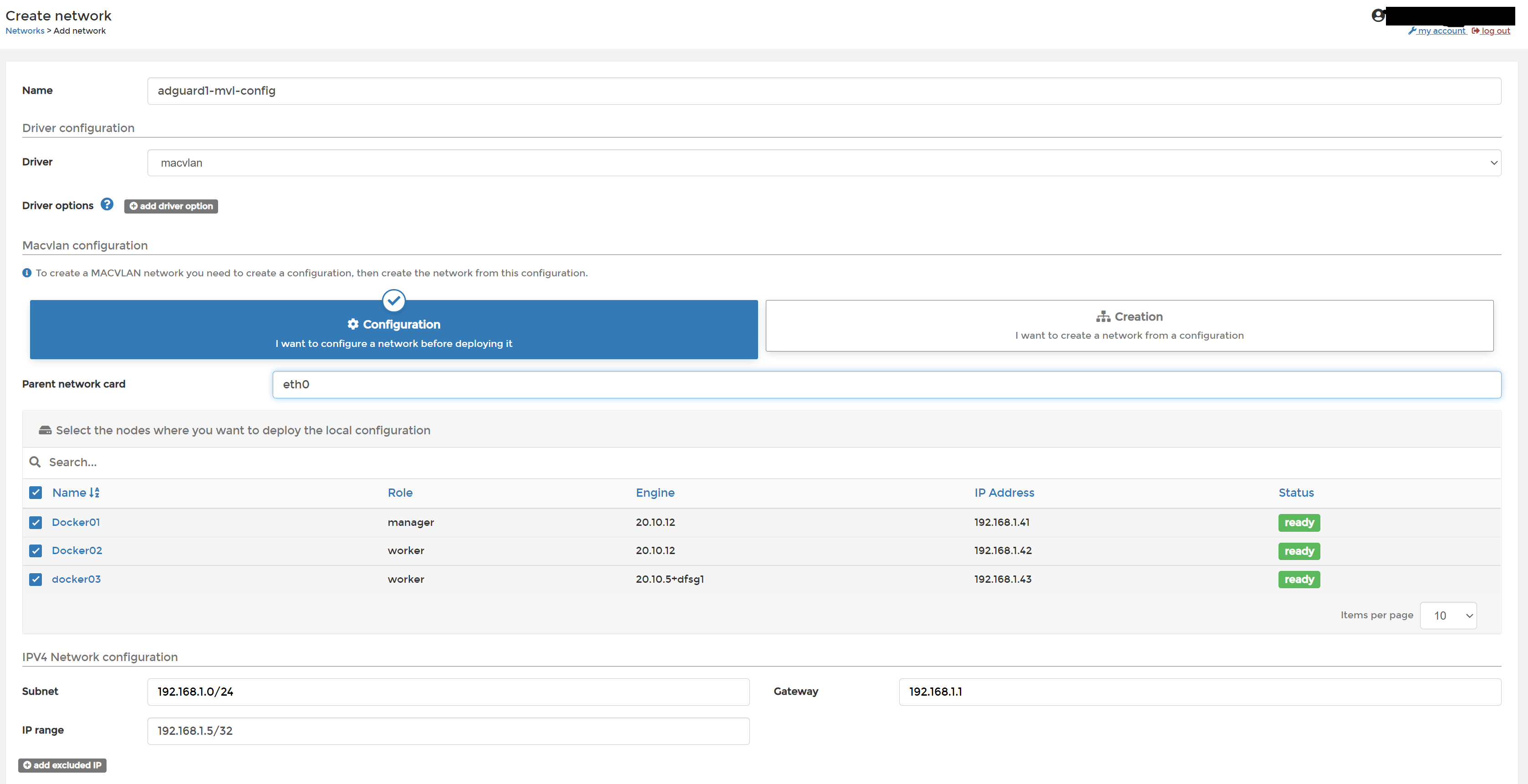
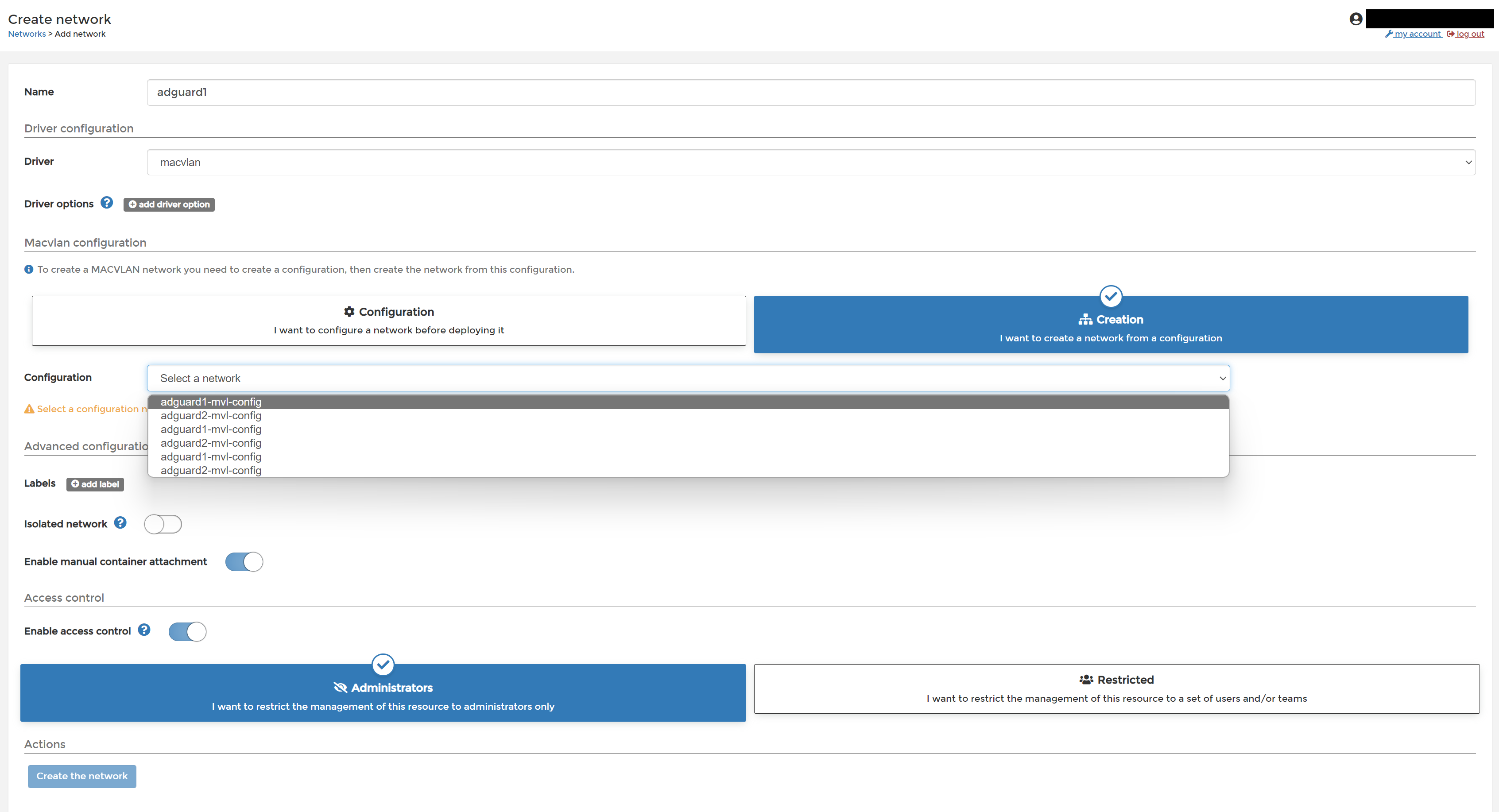
Create the macvlan for adguard1 service
You will have 3 nodes to pick from (see picture) 2 will not work and throw error, 1 will work - it is trial and error to find the right one (the one that works is you managerr node, you only need to this once, not once per node)
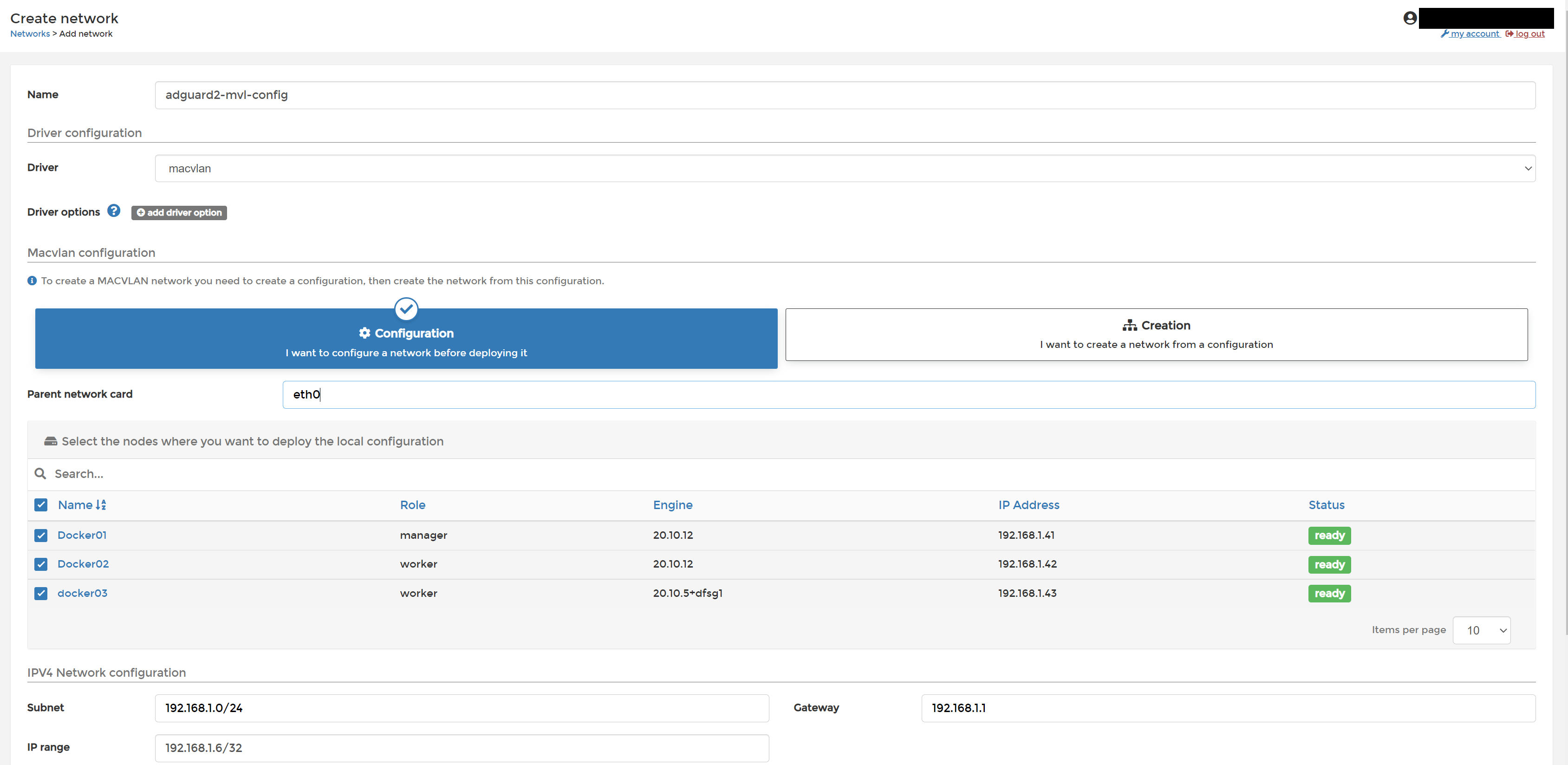
Define the macvlan configuration for adguard2 service
- Do the same again, note the change in IP range.
- make sure you select the 3 docker nodes and get the IP details correct (modify if you don't use 192.168.1.0/24 as your LAN)
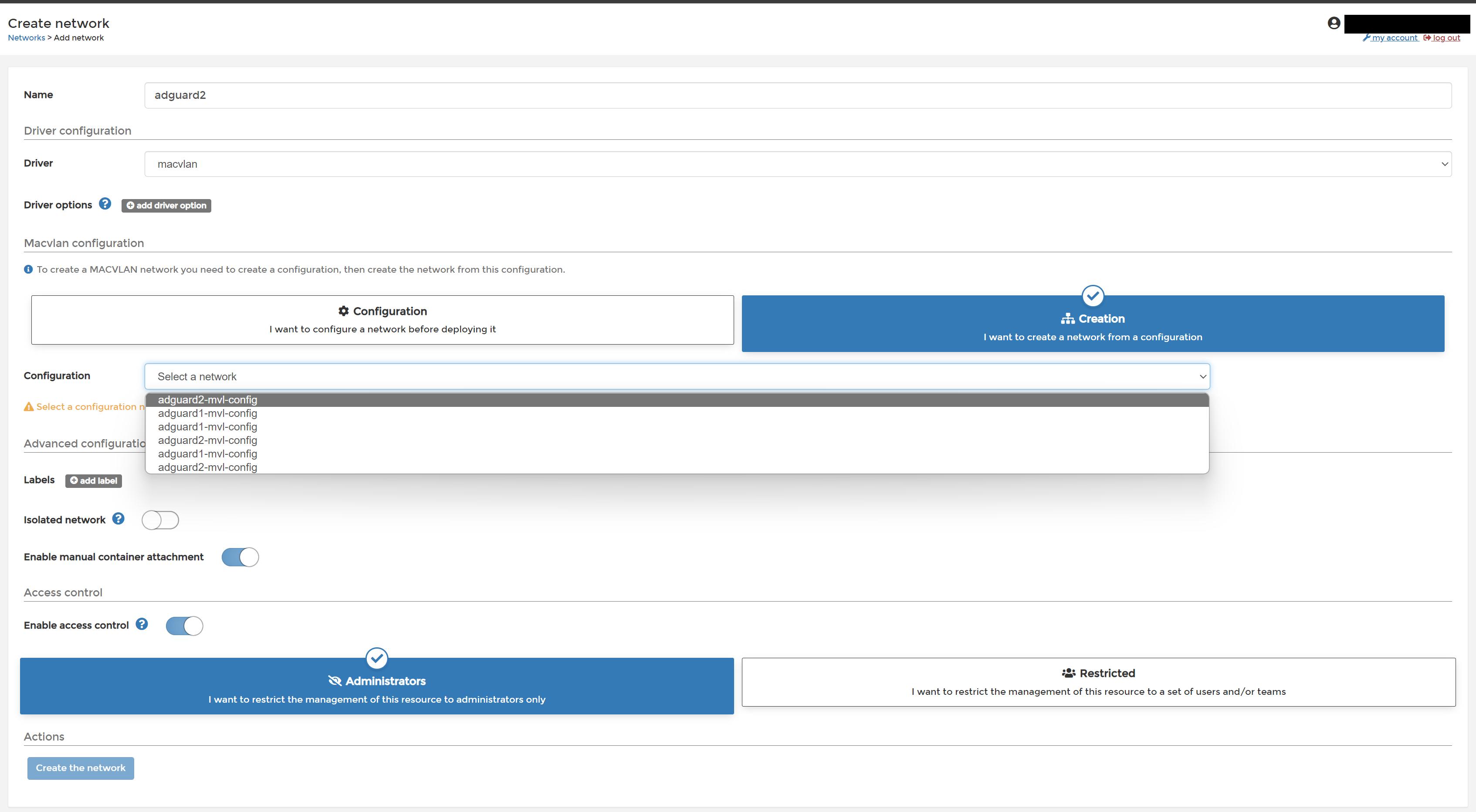
Create the macvlan for adguard2 service
Same as before, it is trial and error as to which one will work
note on adguard sync
This is created automatically from the stack and allows all 3 nodes to talk to each other and have private name resolution (without any need to mess with DNS, hosts) it also keeps the traffic off the LAN
if you have made it to this point, here is the template
version: '3.2'
services:
  adguard1:
    image: 'adguard/adguardhome:latest'
    restart: always
    volumes:
      - work1:/opt/adguardhome/work
      - config1:/opt/adguardhome/conf
    networks:
      - adguard1
      - adguard_sync

  adguard2:
    image: 'adguard/adguardhome:latest'
    restart: always
    volumes:
      - work2:/opt/adguardhome/work
      - config2:/opt/adguardhome/conf
    networks:
      - adguard2
      - adguard_sync

  adguardhome-sync:
    image: ghcr.io/bakito/adguardhome-sync
    command: run
    networks:
      - adguard_sync
    depends_on:
      - adguard1
      - adguard2
    environment:
      # Origin Server is you first server.  For first time run connect to port 3000, set username and password to what you set bellow for source and origin, settings and move admin interface port 80 when propmted.
      - ORIGIN_URL=http://adguard1
      - ORIGIN_USERNAME=username
      - ORIGIN_PASSWORD=password
      # replica server - this will be setup automatically
      - REPLICA_AUTOSETUP=true # if true, AdGuardHome is automatically initialized.
      - REPLICA_URL=http://adguard2:3000  #note the autosetup will not move this port to 3000, hoever as it is replica it doesn't really need to be moved
      - REPLICA_USERNAME=username
      - REPLICA_PASSWORD=password
      - CRON=*/1 * * * * # run every 1 minutes
      - RUNONSTART=true
      # Configure sync features; by default all features are enabled.
      # - FEATURES_GENERALSETTINGS=true
      # - FEATURES_QUERYLOGCONFIG=true
      # - FEATURES_STATSCONFIG=true
      # - FEATURES_CLIENTSETTINGS=true
      # - FEATURES_SERVICES=true
      # - FEATURES_FILTERS=true
      # - FEATURES_DHCP_SERVERCONFIG=true
      # - FEATURES_DHCP_STATICLEASES=true
      # - FEATURES_DNS_SERVERCONFIG=true
      # - FEATURES_DNS_ACCESSLISTS=true
      # - FEATURES_DNS_REWRITES=true
    restart: unless-stopped


volumes:
  work1:
    driver: gluster-vol1
  config1:
    driver: gluster-vol1
  work2:
    driver: gluster-vol1
  config2:
    driver: gluster-vol1

networks:
   adguard1:
     external: true
   adguard2:
     external: true
   adguard_sync:
single node swarm - much less frightening
If you don't want to mess with all of that this will work quite fine (it still requires you to make one macvlan, but if you want to skip that and go for host networking do that. I won't cover that here other than to say remeber you need to use the longform host publishing port syntax.
version: '3.2'
services:
  adguard1:
    image: 'adguard/adguardhome:latest'
    restart: always
    volumes:
      - work1:/opt/adguardhome/work
      - config1:/opt/adguardhome/conf
    networks:
      - adguard1

volumes:
  work1:
    driver: gluster-vol1
  config1:
    driver: gluster-vol1

networks:
   adguard1:
     external: true
what i run now
- the volumes are named binds on cephfs, see stack conventions
- each adguard has a placement constraint from auto-label that keeps it off the other's node
- each adguard has a healthcheck on its own macvlan address, see when a docker VM's NIC changes
- the two sync passwords are in one swarm secret. adguardhome-sync reads it as its
--configfile, see secrets - the cache's minimum TTL override is 0, so an answer lasts as long as its source says. it was 300, which held every short TTL on the internet for five minutes. optimistic caching stays on: it answers from an expired entry while it refreshes, so lookups stay fast
- adguard has no separate setting for "no such name" answers. a name looked up just before it's created keeps failing until the zone's negative TTL runs out, plus one stale answer from the optimistic cache. settings → DNS settings → clear cache fixes it at once
compose.yml, 138 lines, 6 notes
each in the code opens a note on that line. download compose.yml
1 2 3 4 5 6 7 8 9 10 11 12 13 14 15 16 17 18 19 20 21 22 23 24 25 26 27 28 29 30 31 32 33 34 35 36 37 38 39 40 41 42 43 44 45 46 47 48 49 50 51 52 53 54 55 56 57 58 59 60 61 62 63 64 65 66 67 68 69 70 71 72 73 74 75 76 77 78 79 80 81 82 83 84 85 86 87 88 89 90 91 92 93 94 95 96 97 98 99 100 101 102 103 104 105 106 107 108 109 110 111 112 113 114 115 116 117 118 119 120 121 122 123 124 125 126 127 128 129 130 131 132 133 134 135 136 137 138 | |
- asks adguard1 for
localhostat 192.168.1.5, its macvlan address, which adguard answers from its hosts file without going upstream. if that interface is gone, the check fails and swarm replaces the task, see when a NIC changes. - the mirror of adguard2's rule: adguard1 only starts on a node where
auto-label has set
running_adguard2to 0. - the tile on the homepage dashboard.
{{HOMEPAGE_FILE_ADGUARD1_PASSWORD}}is a placeholder homepage fills from a file, so the label holds no password, see widgets and their keys. - adguard2 only starts on a node where auto-label has set
running_adguard1to 0, which keeps it off adguard1's node once the labels are current. - the
commandline passes the swarm secretadguard_sync_configto adguardhome-sync as--config. it is a yaml file holding the origin and replica passwords, and the urls and usernames stay inenvironment. - named binds on the cephfs mount, a work and a conf folder for each adguard. all four folders must exist before the first deploy, or the task refuses to start.
This page started as a gist: the original, with its comments