moving stacks from the web editor to git
all my stacks used to live in portainer's web editor. the compose text was only in portainer's database, and the only backup was portainer's own backup. editing a stack meant editing production, with no history and no review.
this is how i moved them to git.
portainer polls a git repo and redeploys a stack when the commit it is watching changes. each stack gets its own compose path and its own branch, and portainer remembers the last commit it deployed. the default poll is five minutes.
this assumes you already have portainer on a swarm.
pre-reqs
- a git repo, private if your compose files describe your estate (mine does)
- portainer business or CE, both do git stacks
- shell access to a manager node
- somewhere to put secrets. if any stack has a password in it, do the secrets page before this one
1. lay the repo out one directory per stack
stacks/
  swarm/                      # the three node swarm
    adguard/compose.yml
    npm/compose.yml
    gatus/compose.yml
  pi-zwave01/                 # a standalone pi with the radios on it
    ser2net/compose.yml
    zigbee2mqtt/compose.yml
    zwave-js-ui/compose.yml
the path is stacks/<env>/<stack>/compose.yml, and the <env> level is not
optional. i run a stack called dozzle in four environments, and without the
env level they collide. the deploy branch and the renovate PR title are named
after the directory, so make the name readable.
the rest of the examples on this page use those six stacks.
2. fix the compose files before you cut anything over
two things to fix while the stack is still running the old way.
all bind paths must be absolute. a relative ./data resolves inside
portainer's clone of your repo, not on the host. the container starts, finds an
empty directory, reports itself healthy and writes there. if its a database it
initialises a new empty one.
i use an explicit local volume rather than bare bind syntax:
volumes:
  db:
    driver: local
    driver_opts:
      type: none
      device: "/mnt/docker-cephFS/wordpress_db"
      o: bind
if the device path is missing, the task refuses to start. a plain bind creates an empty directory instead, and the app starts against empty storage with no error.
create the device directory once on the shared storage before you deploy. if
it's missing the task fails to start, which is what you want: don't have
anything create it for you.
if a volume with the same name is already on a node, docker reuses it and
ignores driver_opts. to check, run this after deploying, on the node running
the task:
it must show device, o and type. null or {} means the old volume was
reused, see troubleshooting.
check the repo file against what is running. my portainer database had been restored from backup at some point, and several stacks in it did not match reality. the running container is the source of truth, not portainer's stored copy and not your new repo file. before you delete anything, compare the images and every bind and device path. two small scripts against the docker api were enough.
3. one branch per stack, not main
don't point every stack at main. portainer compares the commit, not the file,
so with every stack on main, every commit to main redeploys all of them,
whether their compose changed or not. a typo fix in a readme redeploys the
lot. an unchanged redeploy restarts nothing, but it still moves every service's
updated time, and each redeploy is one more chance to fail.
each stack points at its own branch instead:
deploy/swarm/adguard
deploy/swarm/npm
deploy/swarm/gatus
deploy/pi-zwave01/ser2net
deploy/pi-zwave01/zigbee2mqtt
deploy/pi-zwave01/zwave-js-ui
there is one branch per stack directory, with the same name. nobody commits to
them directly; the workflow in the next step moves them. a change to
stacks/swarm/npm/compose.yml moves deploy/swarm/npm and redeploys npm, and
the other five stacks stay as they are.
the pi-zwave01 branches above are for a standalone docker host, not the swarm:
a raspberry pi that holds the radios and runs the Portainer agent. see
the pi's stacks.
the repo layout, the branches and the workflow in the next step work the same
for it. the cutover in step 6 does not. it captures swarm
service state and waits out an overlay network, and a standalone host has
neither, only compose containers. the compose files differ too: a standalone
host honours container_name, restart and devices, which swarm ignores.
nothing deploys from main itself. a merge to main moves the deploy branches of
the stacks it changed, and portainer deploys from those.
4. the workflow that moves the branches
.github/workflows/promote.yml works out which stack directories the push
touched and fast forwards those deploy branches. it only pushes refs and never
talks to portainer, so it needs no credentials, no path to your lan and no self
hosted runner. portainer's polling does the rest.
name: promote

on:
  push:
    branches: [main]

permissions:
  contents: write        # the only permission needed

jobs:
  promote:
    runs-on: ubuntu-latest
    steps:
      - uses: actions/checkout@v5
        with:
          fetch-depth: 0        # needed, it diffs two commits

      - name: promote changed stacks
        env:
          BEFORE: ${{ github.event.before }}
          AFTER: ${{ github.sha }}
        run: |
          set -euo pipefail

          # a new branch or a force push leaves BEFORE unusable. promote nothing
          # rather than guess, the deploy branches keep serving what they have
          if [ "$BEFORE" = "0000000000000000000000000000000000000000" ] \
             || ! git cat-file -e "${BEFORE}^{commit}" 2>/dev/null; then
            echo "::warning::no usable before-SHA; promoting nothing"; exit 0
          fi

          # --no-renames, or a file moved between stacks only shows its new
          # path, and the stack it left is not promoted
          changed="$(git diff --no-renames --name-only "$BEFORE" "$AFTER")"
          [ -z "$changed" ] && { echo "nothing changed"; exit 0; }

          refs=""
          while IFS= read -r dir; do
            if printf '%s\n' "$changed" | grep -q "^${dir}/"; then
              branch="deploy/${dir#stacks/}"
              refs="${refs} ${AFTER}:refs/heads/${branch}"
              echo "  $dir -> $branch"
            fi
          done < <(find stacks -mindepth 2 -maxdepth 2 -type d | sort)

          [ -z "$refs" ] && { echo "no stack directories changed"; exit 0; }

          # ONE push, all refs, --atomic. a plain multi ref push is NOT all or
          # nothing: refuse one ref and the others still land
          git push --atomic origin $refs
find stacks -mindepth 2 -maxdepth 2 -type d picks up stacks/<env>/<stack>
and nothing else, so adding a stack needs no edit here. add the directory and
merge it, and the workflow creates its deploy branch on that push. then point
portainer at it.
deleting a stack directory retires nothing. the find only sees directories
that still exist. if a commit deletes stacks/swarm/adguard/, the workflow
matches nothing, promotes nothing and prints "no stack directories changed",
even though a stack file did change. deploy/swarm/adguard stays where it is,
and portainer carries on serving the last commit it saw, indefinitely. mine also
prints a warning while a removed directory's deploy branch still exists.
promoting the deletion would not help either: portainer would fetch a commit with no compose file at the configured path and error. retiring a stack is manual:
- delete the stack in portainer
- delete
deploy/<env>/<stack>:git push origin --delete deploy/<env>/<stack> - then remove the directory from git
renaming has the mirror problem. the new directory looks like a change, so the
push creates deploy/<env>/<newname>, which nothing polls, and the old branch
is left stale.
--atomic is not optional. without it, a push that has one ref refused still
lands the others, so a commit touching two stacks gets half of itself into
production. with it, every branch moves or none do.
a commit that edits stacks/swarm/npm/compose.yml,
stacks/pi-zwave01/ser2net/compose.yml and a readme prints:
two branches move, the other four don't, and the readme moves nothing.
5. protect the deploy branches
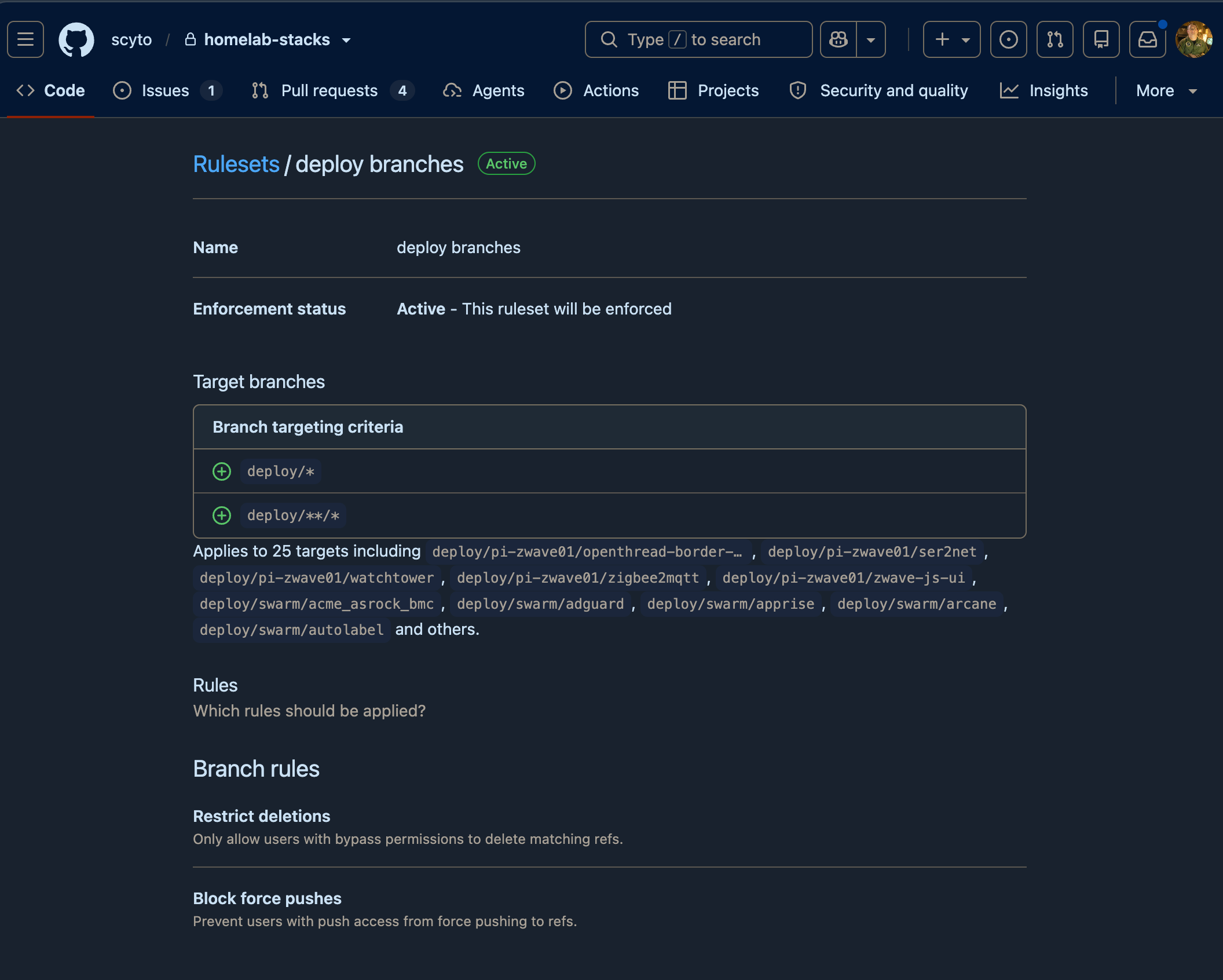
block force pushes on deploy/* so a deploy branch can only ever move forward,
onto a commit that passed ci. that makes rollback a revert rather than a
rewrite, see step 7.
leave deletions allowed. a deploy branch only ever points at a commit that is
also on main, so deleting one loses nothing, and retiring a stack stays one
push.
a ruleset targeting deploy/** matches nothing, because of how github's **
matching works. it shows as active and enforces nothing. you need both patterns:
you type those in the UI. the API stores them prefixed, as
refs/heads/deploy/*, so gh api repos/<owner>/<repo>/rulesets/<id> reads
back differently from what you entered.
check the applies to N targets line under the patterns. it should equal your number of deploy branches. if it reads less, the pattern is wrong, whatever the ruleset's status says. then try to push something the rule should forbid and confirm you are refused.
once renovate is opening PRs, add rules for main itself: require a PR, and
require your ci check. see
image updates with renovate.
6. cut a stack over
this is a delete and recreate, not an edit. portainer always deploys on create.
before you touch anything, capture what is running so you can diff after:
docker stack ls --format '{{.Name}}' | while read s; do
  docker service inspect $(docker stack services -q "$s") > "/tmp/pre-gitops-$s.json"
done
then per stack:
- confirm the hardware is present if the stack needs it,
ls -l /dev/serial/by-id/ - confirm every secret and config the compose references already exists
- note the exact stack name. you must reuse it, because service dns is
<stack>_<service> - delete the stack in portainer
- wait for the overlay network to go away, see below
-
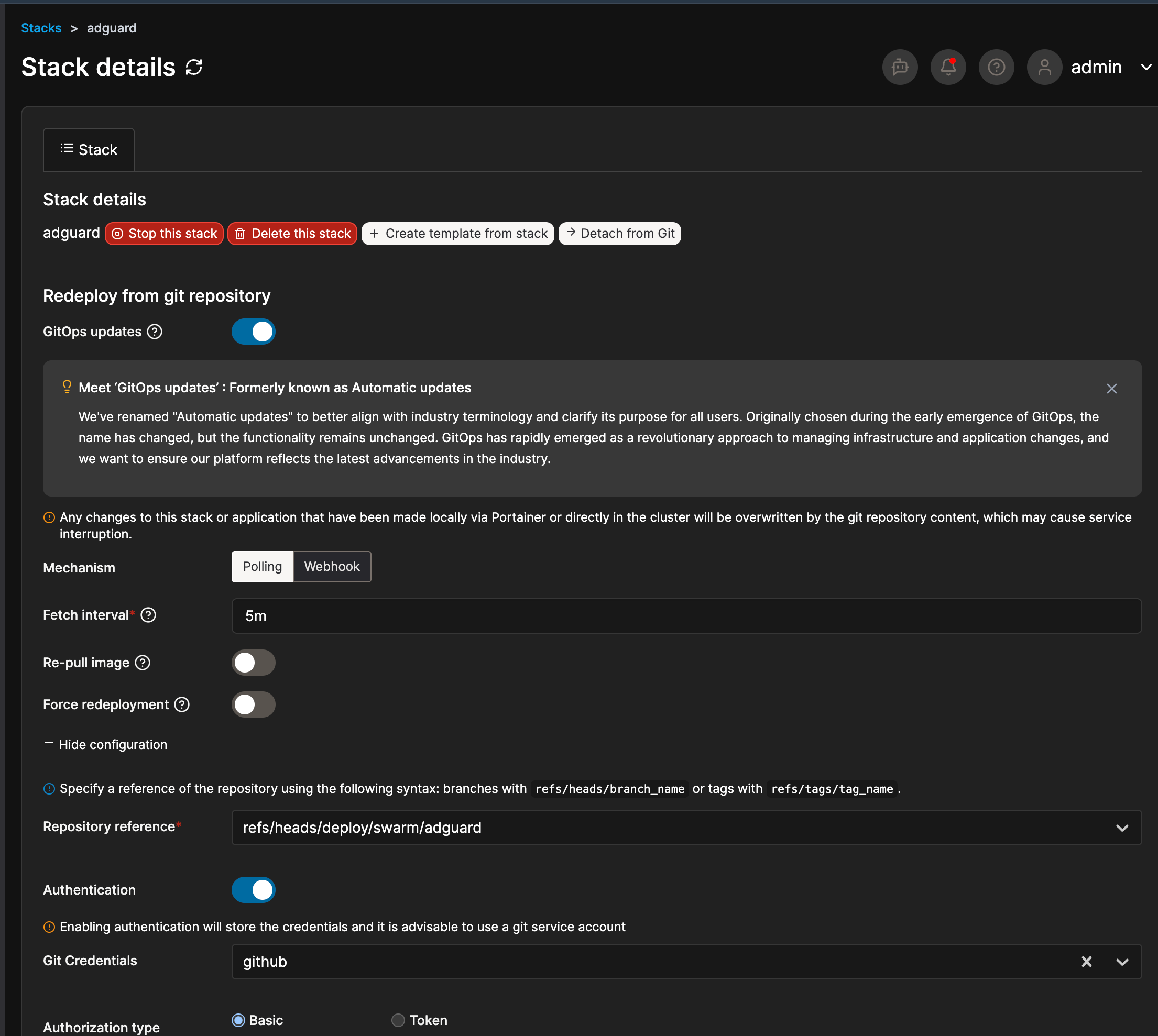
Stacks > Add stack > same name > Git repository, then
field value, for adguard Repository URL your repo Repository reference refs/heads/deploy/swarm/adguardCompose path stacks/swarm/adguard/compose.ymlGitOps updates on, polling, 5m the reference dropdown lists every ref on the repo. that includes a
refs/pull/<n>/headfor every PR ever opened, and github never removes them. type part of the branch name to filter it. it starts onrefs/heads/main, so check it again just before you deploy. never pick arefs/pullref: it can be a commit nobody reviewed, and your ruleset doesn't cover it -
diff
docker service inspectagainst the capture you took above
the screenshot below shows the same fields on a stack that is already git
backed and working. Re-pull image and Force redeployment are both off.
renovate changes the tag in git, so portainer has nothing to re-pull behind your
back. force redeployment redeploys on every poll whether git changed or not:
portainer's tooltip says a regular stack is "redeployed whenever triggered,
without checking for docker-compose file changes". it does put back a stack that
was changed or removed outside git, which polling cannot see, but that is rare,
and pull and redeploy fixes it when it happens.
7. rolling back a compose
deploy branches are fast forward only, so a rollback is not a force push. its a
revert on main that gets promoted forward like any other change:
git checkout -b revert/npm-bad-change
git revert <bad-sha>              # or just edit the file back by hand
git push origin revert/npm-bad-change
gh pr create --fill && gh pr merge --rebase
promote moves deploy/swarm/npm forward to the revert, and portainer picks it
up on the next poll, under five minutes after the merge.
a revert keeps the history, and the deploy branches only ever point at a commit that passed ci. the cost is speed: it needs a PR and a ci run. if something is broken right now:
- stop the stack in portainer. it takes effect at once, and you do the revert
after. a stopped stack isn't polled, so once the revert is merged,
pull and redeployit - roll forward, if the fault is obvious and small
- suspend the ruleset, force push, and put the ruleset back:
gh api repos/<owner>/<repo>/rulesets                       # get the id
gh api -X PUT repos/<owner>/<repo>/rulesets/<id> -F enforcement=disabled
# force push the rollback, then IMMEDIATELY
gh api -X PUT repos/<owner>/<repo>/rulesets/<id> -F enforcement=active
reverting the image tag on something that ran a schema migration on startup gets you the old binary against the new schema. for databases, take the backup before you merge the bump, not after.
traps
- check hardware is present before cutting over a device dependent stack. create always deploys, and if the deploy fails the rollback fails the same way and the stack record is gone. a compose that is only in the web editor goes with it
- deleting a stack races its own overlay network.
<name>_defaulttakes a moment to tear down, and recreating too fast fails on a network that is still being deleted. the rollback hits the same race. wait for the network to go:
- a stopped stack stops tracking git. portainer doesn't poll stopped stacks, so they sit at their last deployed commit and fall behind while looking fine in the stack list
- anything external isn't in the compose. my adguard macvlan networks are
external: trueso that deleting a stack can't destroy them, which also means git can't recreate them. keep a script. config-only networks are per node, and they must exist on every node before the swarm scoped one can be created on a manager - the same goes for node labels, if you use placement constraints. mine are generated by a labelling container, so they rebuild themselves. a hand applied label exists nowhere but the raft log