image updates with renovate
i ran watchtower and shepherd for years, both are gone, replaced with renovate.
difference is renovate never touches a running container. it reads the compose files in git, spots a newer image and opens a pull request editing the compose. nothing moves until i merge, then my normal deploy path picks it up.
assumes you have your stacks in git already, this is pointless otherwise.
why bother
- i get a diff and a changelog link before anything moves
- i can say no, or not-this-one, per image
- covers swarm services and standalone containers the same way (watchtower could only do standalone, shepherd only swarm)
- nothing needs the docker socket, both the old ones held it
- rollback is
git revert
cost is updates are no longer automatic. thats the point, but you do have to read the PRs.
Pre-reqs
- compose files in a github repo
- admin on that repo (you are adding secrets and a workflow)
- a github account you can create an app under
i run it as a scheduled github action, not the mend-hosted app, because the repo is private and i want the credentials to be mine.
Create a github app
use an app, not a PAT. a PAT carries all your own permissions everywhere, and a fine grained one expires within a year, after which renovate stops opening PRs with nothing failing to tell you. an app install doesn't expire.
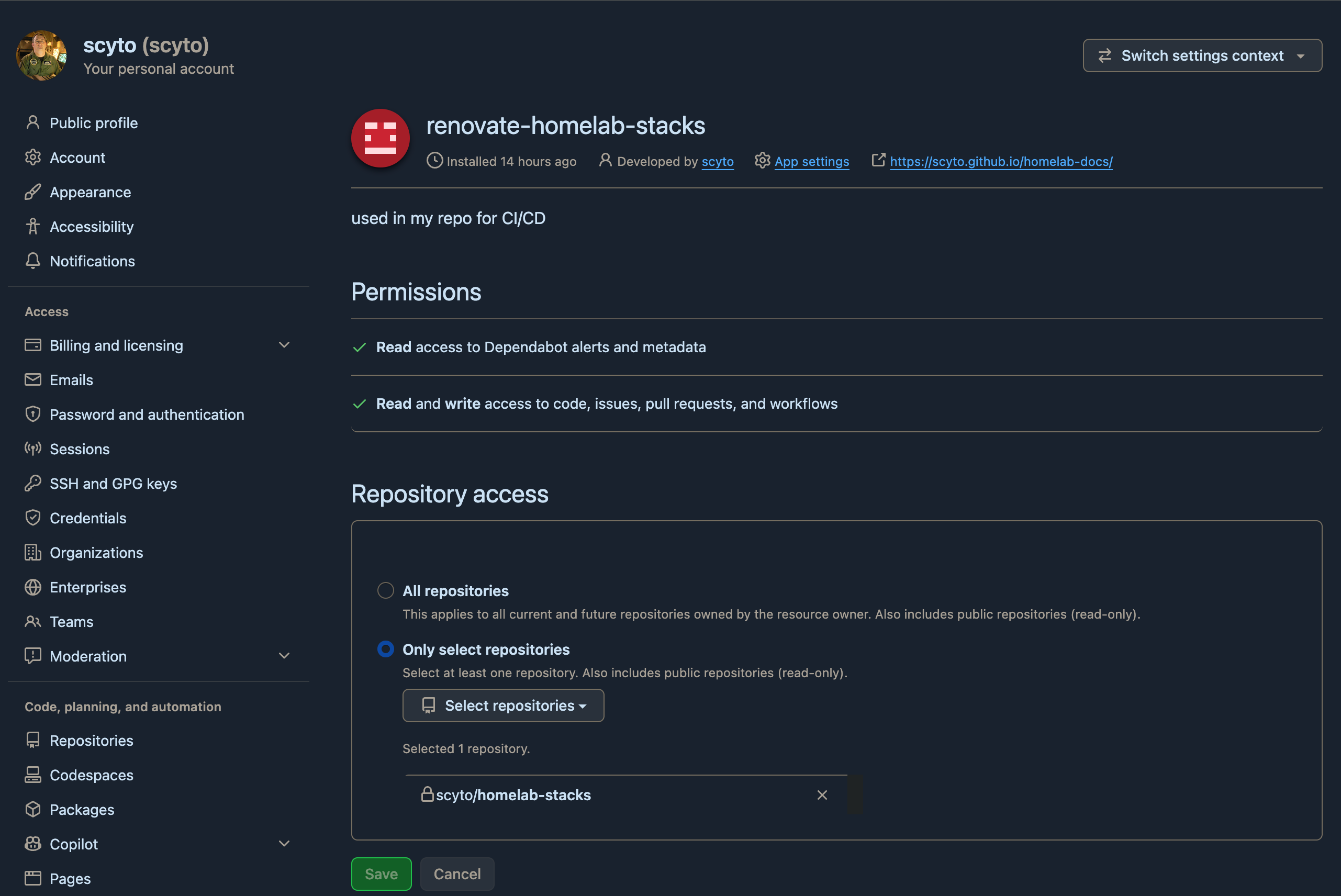
- github > settings > developer settings > GitHub Apps > New GitHub App
- name it whatever, homepage url can be your repo
- uncheck webhook active, you don't need it
- set the repository permissions per the table below
- create it, then Generate a private key, it downloads a
.pem - note the App ID from the top of the app page
- Install App > install it on just the one repo, not all repos
| permission | access | why |
|---|---|---|
| Contents | read & write | it pushes the branch |
| Pull requests | read & write | it opens the PR |
| Issues | read & write | the dependency dashboard is an issue |
| Workflows | read & write | only needed if it bumps .github/workflows versions |
the list in the UI is alphabetical so Contents is nowhere near Pull requests, and Workflows is right at the bottom. easy to miss one.
Add the two secrets
repo > settings > secrets and variables > actions > New repository secret
| name | value |
|---|---|
RENOVATE_APP_ID |
the app id number |
RENOVATE_APP_PRIVATE_KEY |
whole contents of the .pem, including the BEGIN/END lines |
Add the workflow
.github/workflows/renovate.yml
name: renovate

on:
  schedule:
    - cron: "0 12 * * 1"        # mondays ~05:00 my time
  workflow_dispatch:

concurrency:
  group: renovate
  cancel-in-progress: false

jobs:
  renovate:
    runs-on: ubuntu-latest
    steps:
      - uses: actions/checkout@v5

      - name: mint an installation token
        id: app-token
        uses: actions/create-github-app-token@v3.2.0
        with:
          app-id: ${{ secrets.RENOVATE_APP_ID }}
          private-key: ${{ secrets.RENOVATE_APP_PRIVATE_KEY }}

      - uses: renovatebot/github-action@v46.2.3
        with:
          token: ${{ steps.app-token.outputs.token }}
        env:
          RENOVATE_REPOSITORIES: ${{ github.repository }}
          RENOVATE_PLATFORM: github
          RENOVATE_BASE_BRANCHES: main
do not use the built in GITHUB_TOKEN here. PRs opened with it don't trigger
pull_request workflows, so your own validation never runs, and if main requires
those checks the renovate PRs can never be merged.
Add renovate.json
in the repo root. this is a cut down version of mine.
{
  "$schema": "https://docs.renovatebot.com/renovate-schema.json",
  "extends": ["config:recommended"],
  "timezone": "America/Los_Angeles",
  "schedule": ["before 6am on monday"],
  "prConcurrentLimit": 5,
  "dependencyDashboard": true,
  "ignorePaths": ["_attic/**"],
  "commitMessageSuffix": " [{{packageFileDir}}]",
  "packageRules": [
    {
      "matchCategories": ["docker"],
      "pinDigests": false
    },
    {
      "matchUpdateTypes": ["patch"],
      "groupName": "patch updates {{packageFileDir}}"
    },
    {
      "matchUpdateTypes": ["major"],
      "dependencyDashboardApproval": true
    },
    {
      "matchPackageNames": ["adguard/adguardhome", "jc21/nginx-proxy-manager"],
      "dependencyDashboardApproval": true
    },
    {
      "matchPackageNames": ["portainer/portainer-ee", "portainer/agent"],
      "enabled": false
    }
  ]
}
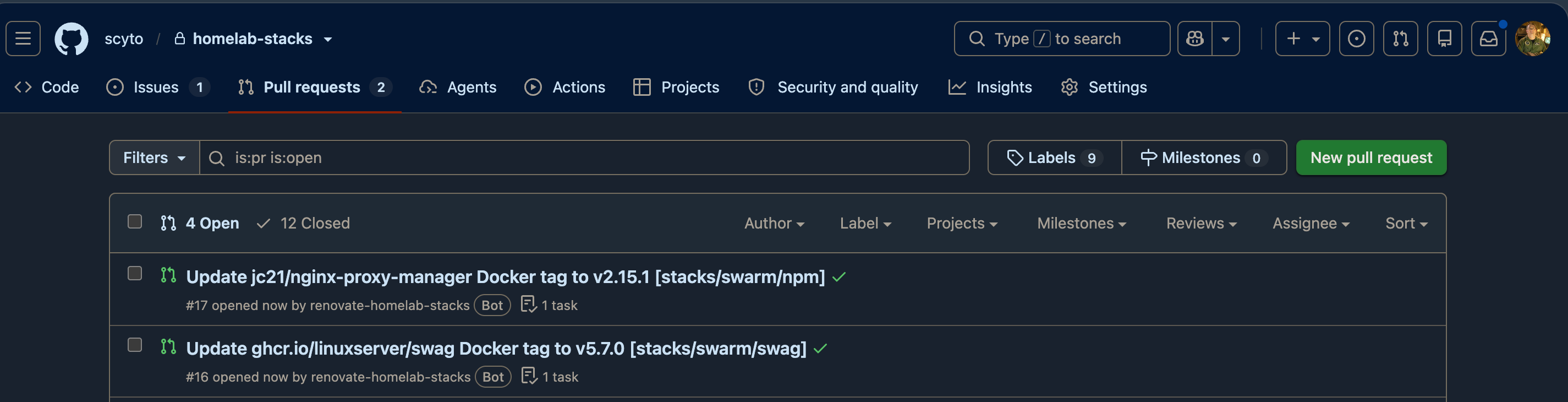
with the layout from the gitops page that gives PR titles like:
Update jc21/nginx-proxy-manager Docker tag to v2.12.6 [stacks/swarm/npm]
patch updates stacks/pi-zwave01/zwave-js-ui
which is what you want, because merging the first one moves deploy/swarm/npm
and nothing else.
what each bit is doing:
commitMessageSuffixputs the stack directory in the commit subject. with twenty odd stacks this is the difference between a readable git log and mushgroupNamewith{{packageFileDir}}gives you one PR per stack instead of one per image, which is a lot less noisedependencyDashboardApproval= don't open a PR, put it on the dashboard with a checkbox and wait for me. i use it for major bumps, anything with a database in it, anything home assistant has to stay compatible with, and anything thats bitten me beforeenabled: falsefor images you never want it to touch. portainer can't safely redeploy itself so it stays manualignorePathsfor junk drawers, otherwise it raises PRs for stacks you aren't running- if you want a whole stack left alone rather than an image, match the directory instead:
Run it
don't wait until monday, run it by hand first
repo > Actions > renovate > Run workflow
first run it opens an issue called Dependency Dashboard listing everything it found, plus whatever PRs it is allowed to open.
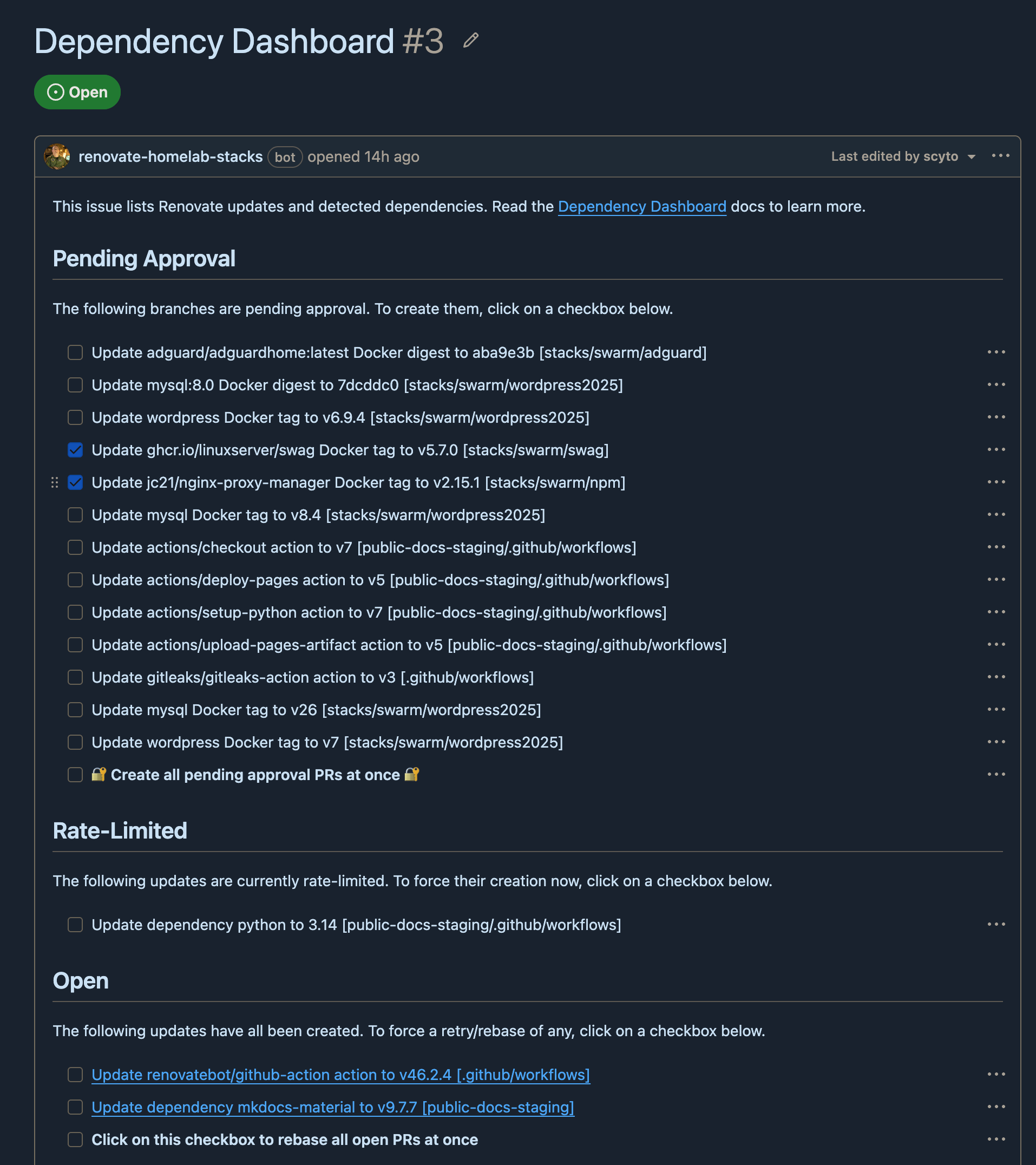
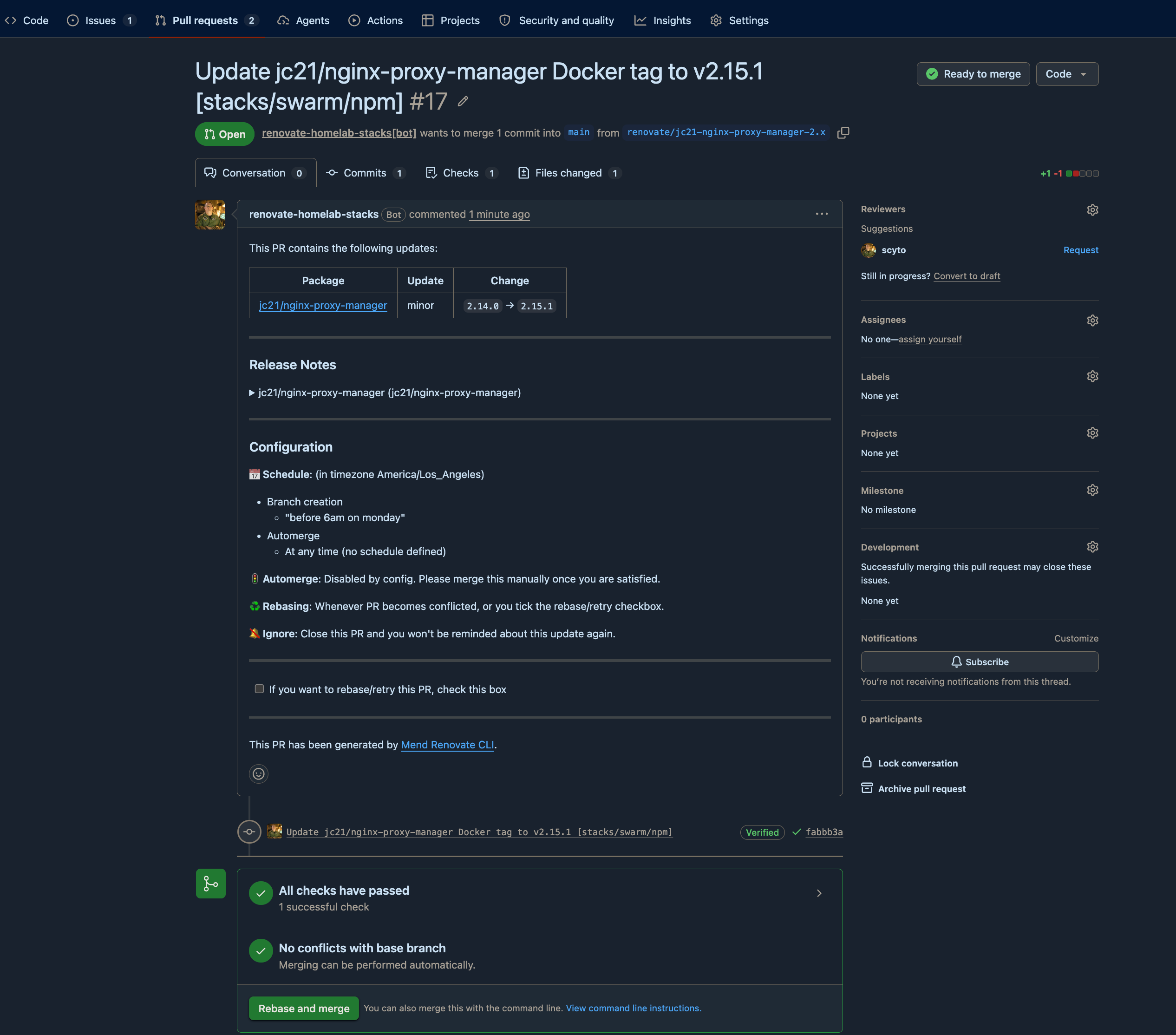
tick a checkbox on the dashboard and the PR appears on the next run.
thats it. merge a PR and your normal deploy path does the rest.
Lock the branches down, last
do this after renovate has opened its first PR, not before. you cannot require a status check until a run has reported one, and the name has to match exactly.
on main:
| rule | why |
|---|---|
| require a pull request before merging | otherwise renovate's whole point is optional |
| require status checks, tick your validate job | this is the gate |
| block force pushes | keeps history honest |
the check name in the ruleset is the job name: from your workflow, not the
file name and not the workflow name. rename the job later and every PR sits there
forever waiting on a check that never reports, with nothing failing to tell you
why. change both together or not at all.
on deploy/*, block force pushes and deletions so a deploy branch can only move
forward. mind the ** trap covered on the
gitops page, a ruleset targeting refs/heads/deploy/**
matches nothing and shows as active while enforcing nothing.
do not add renovate's app to any bypass list. the point is that its PRs go through the same gate as yours.
rolling one back once its merged is a revert on main, promoted forward, see
rolling back a compose.
Notes
- if renovate dies with
FORBIDDENmentioning["repository","issues"]you missed the Issues permission, the dashboard is an issue - if it does all your compose files fine and then fails only on a
.github/workflowsbump, thats the Workflows permission - the dashboard issue regenerates, closing it does nothing, don't bother tidying it
- the dashboard doesn't say which host a stack is on, only the directory, so name your directories usefully
- check your actions minutes. my validation workflow was burning ~300 minutes a day which on a private repo is real money. billing rounds each job up to a whole minute, so five jobs finishing in nine seconds each bill as five minutes not one. i collapsed mine into a single job and it went from ~5 billed minutes a run to 1. the actual work takes under twenty seconds